Intended Audience and Contact Information
| Contact | Chief Data Officer, Office of the CIO |
|---|---|
| Intended audience | Internal UBC |
| Report Standard ID | DGR002 |
Change Log
Definition
Workday Calculated Fields are configurable field definitions associated with a business object that use data in Workday. Calculated fields enable you to work with data on transactions throughout Workday, including business processes, integrations, reporting and scheduling recurring processes.
Within a report, calculated fields can be used to derive values, group and transform data, manipulate data, or retrieve values.
Purpose
The purpose of this standard is to achieve consistency in the naming of calculated fields within reports and/or integrations, as well as recording the specified attributes related to calculated fields in Workday.
This standard is to be adhered to at all times. Exceptions are listed in the Dispensation section.
Standard
Calculated fields can only be created by a Calculated Field Administrator. If you cannot find a calculated field for consumption in a report, reach out to the Integrated Service Centre (ISC). Before creating a new calculated field, ensure there is no other field that currently exists for the calculation.
Calculation Description
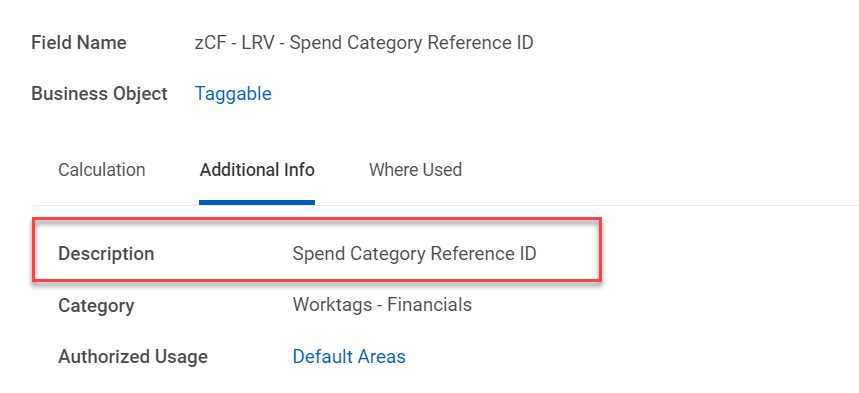
A meaningful description of what the calculated field provides including any limitations must be provided. Calculated fields are to be considered reusable data points that can enable more than one business functionality.
The description should provide a general understanding of the use for the calculated field; include the subject (i.e. worker, translated debit minus credit, position) and the module that is used for (e.g. Payroll, Compensation, Student).
<Description>
Calculation Category and Authorized Usage
The Authorized Usage field can have either one of the following options:
- “Default Areas” should be used for calculated fields which could be used in all areas.
- “Default Areas” and “Calculation Engine (Payroll/Absence)” together, or “Calculation Engine (Payroll/Absence)” alone, should be used when creating calculated fields for Calculation Engines. Note: The Calculation Engines option can be used for multiple areas, and not just for Payroll/Absence.
When Authorized Usage is “Default Areas”, each calculated field should be assigned under one or more categories below:
- The Category field for Student use: "Worktags - Student"
- The Category field for HCM use: "Worktags - HCM / Headcount Planning"
- The Category field for Financials use: "Worktags - Financials"
- The Category field for Cross domains reports use: “Worktags - All Functional Areas”
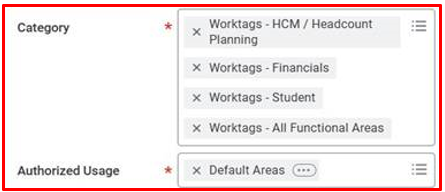
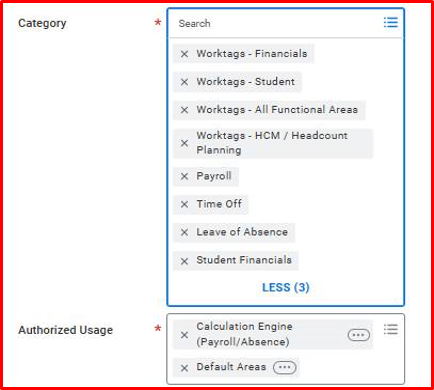
When Authorized Usage has both “Default Areas” and “Calculation Engine (Payroll/Absence)”, or Authorized Usage has “Calculation Engine (Payroll/Absence)” only, each calculated field should be assigned under one or more categories below:
- The Category field for Student use: "Worktags - Student"
- The Category field for HCM use: "Worktags - HCM / Headcount Planning"
- The Category field for Financials use: "Worktags - Financials"
- The Category field for Cross domains reports use: “Worktags - All Functional Areas”
In addition to the four categories listed above, one or more of the following four categories can be added to calculated fields set up:
- The Category field for Payroll calculations use: “Payroll”
- The Category field for Time Off calculations use: “Time Off”
- The Category field for Leave of Absence calculations use: “Leave of Absence”
- The Category field for Student Financials calculations use: “Student Financials”
Intermediate Calculations
Where a calculation is for an intermediate calculation and has no potential for reuse, ensure you check the box for Intermediate Calculation in the Additional Info tab of the "Create Calculated Field" or "Edit Calculated Field" tasks.

Compliance
This standard must be complied with every stage of report development and maintenance with the exception of any dispensations (see Dispensation section)
Dispensation
A Workday report built as a Search Type report, and has no ability to provide an override label, is exempt from the above standard for the Calculated Field Naming Convention.
The following is the list of calculated fields created on the Course Section business object that have been approved as exempt:
- Course Section Definition Public Notes
- Building External URL
- Drop and Withdrawal Deadlines
- Clustered Course Sections
The above calculated fields are to be used in the exempt format in any other report type, regardless of whether they have the ability to provide an override label or not, so as to avoid duplication.
Related Documents
Workday Reference IDs Data Standard
https://confluence.it.ubc.ca/pages/viewpage.action?pageId=168831503
https://confluence.it.ubc.ca/pages/viewpage.action?pageId=178600713