Information Security Guideline
CS1: A group of students remotely accessing Workstations in a lab
Summary
A department has a set of specialized high-performance Workstations. The Workstations can be operated locally, but the department would also like students to be able to Remotely Access the Workstations as part of a course using VNC to view the workstation GUI. The only information stored and processed on the workstations would be student course work. There is no Web or Database Server, and the Information Security Risk Classification of the student course work is Medium Risk.
All Workstations, Servers, and services are behind the department Network Firewall.
To determine which sections of M10 are applicable, an analysis would be conducted. Given that analysis, the following considerations would ensure compliance with M10 (compliance with all other standards is required and is assumed).
Security Architecture Requirements
- [S2.4] The VNC used to view the Workstation GUI is considered a ‘service’, and therefore the Workstations must be located behind a Boundary-protected Interface. In this case, the department Network Firewall is considered the Boundary-protected Interface.
- The Workstations are not considered Servers so the Information Security Risk Classification of the student course work does not introduce additional requirements from this section.
Network Protocol Requirements
- [S3.1] Because the information is Medium Risk, it must be Encrypted and comply with all listed requirements in this section. A VNC product that supports compliant encryption in transit must be selected – it is not sufficient to rely upon the encryption of the VPN connection as it does not cover the entire Server to User pathway (see section 3.1.2).
- [S3.4] Students accessing a Workstation is considered ‘remote User access’ (as opposed to 'remote Privileged Account access'); therefore, section 3.4.2 applies in this case.
- [S3.5] Remote Access is only accessible after connecting to a UBC VPN. The VPN must be configured in compliance with S3.5. If the general UBC VPN pool is being used, it is compliant for this use case.
Firewall Configuration
- The department Network Firewall rule set was reviewed looking at both Workstations and Servers and determined to be configured in compliance with M10, S4.2 (Firewall Configuration).
- The configuration of the department Network Firewall was broadly reviewed and determined to be in compliance with M10, S4 (Firewall Configuration).
- As a result, no additional changes are required to the configuration of the department Network Firewall other than adding the required rules to enable VNC access strictly from the VPN pool being used.
Conclusion
- These sections are the most directly applicable in this case: 2.4, 3.1, 3.4.2, 3.5
CS2: A system administrator remotely accessing Servers in a lab
Summary
A system administrator supports several research labs that have Servers used to manage specialized equipment in the lab by users working on-site on the same LAN (Users do not access these Servers remotely). The system administrator manages these Servers by connecting remotely to perform maintenance and patching during off-hours and idle time when the lab is not using them. The Servers themselves store and process Low Risk and Medium Risk information.
This is similar to Case Study CS1, however this deals with Privileged Account access and not User access.
All Workstations, Servers, and services are behind the department Network Firewall and the Remote Access will be conducted using a PAM proxy service.
To determine which sections of M10 are applicable, an analysis would be conducted. Given that analysis, the following considerations would ensure compliance with M10 (compliance with all other standards is required and is assumed).
Security Architecture Requirements
- [S2.4] In this case, the department Network Firewall is considered the Boundary-protected Interface.
- The Servers are accessed by Users to control machines, but are not accessed remotely. Because these Servers are not accessible from the internet or a broadly accessible UBC network they are not considered Client-facing.
- They must therefore be controlled by the Principle of Least Privilege (section 2.6) and be logically separated from any Client-facing Servers and services.
Network Protocol Requirements
- [S3.1] Because the information is up to Medium Risk, it must be Encrypted and comply with all listed requirements in this section. A PAM proxy service (see section 3.1.4) will address this requirement.
- [S3.4] A system administrator performing maintenance is considered 'remote Privileged Account access' (as opposed to 'remote User access'); therefore, section 3.4.1 applies in this case.
- [S3.5] Remote Access via the PAM proxy is only accessible after connecting to a UBC VPN. The VPN must be configured in compliance with S3.5. Assuming the general UBC VPN pool is being used, it is compliant for this use case.
Firewall Configuration
- The department Network Firewall rule set was reviewed looking at both Workstations and Servers and determined to be configured in compliance with M10, S4.2 (Firewall Configuration).
- The configuration of the department Network Firewall was broadly reviewed and determined to be in compliance with M10, S4 (Firewall Configuration).
- As a result, no additional changes are required to the configuration of the department Network Firewall other than adding the required rules to enable PAM proxy access strictly from the VPN pool being used.
Conclusion
These sections are the most directly applicable in this case: 2.4, 2.6, 3.4.1, 3.5
- [S2.4] and [S2.6] are the most directly applicable to the non-Client-facing Servers.
- [S2.8] also applies as this is Medium Risk information.
- [S3.4.1] and [S3.5] are the most directly applicable regarding remote Privileged Account access.
- [S4] also applies however most of this should be covered by the UBC Firewall.
CS3: On-premise Web Application Server processing High Risk Information w/a Database
Summary
A department is using the VolunTrack application to track student volunteers for projects and activities. Activity coordinators need to perform a level of identity proofing when volunteers arrive for activities. To support this, the application records each student volunteer’s name, phone number, and photo. Students log in to the application to update their own photos, and volunteer coordinators review records and run reports. There are separate roles in this system for volunteers and coordinators to ensure that they can only access the information they require for their role. The domain name of this application is voluntrack.foo.ubc.ca.
The Information Security Classification of information stored in this system is High Risk.
The application is accessible from the internet. It runs on a Linux, Apache, MariaDB, Tomcat, and Java stack. All functions are hosted on a single Server, which is configured with a Host-based Firewall and sits on a network with many other peer Servers, including other application back-end and Database Servers. The application is fronted by the UBC Web Application Firewall (WAF) service. All Servers, services, and supporting infrastructure are behind the department Network Firewall. For the purposes of system administration activities, department system administrators connect to their named department myVPN pool.
To determine which sections of M10 are applicable, an analysis would be conducted. Given that analysis, the following considerations would ensure compliance with M10 (compliance with all other standards is required and is assumed).
Security Architecture Requirements
| M10 Section | Compliant? | Notes / Recommendations |
|---|---|---|
| 2.1 | No | This application processes High Risk Information, and the web and database functions are hosted on the same Server. This architecture is non-compliant and will require compensating controls. While the application is protected by a Web Application Firewall (WAF) [2.1.1], a full analysis on whether the compensating controls are sufficient would need to be performed by UBC Cybersecurity. Recommendations: A brief analysis should be performed to determine which of the following options is most suitable. (a) Relocate the database functionality to a separate, non-Client-facing Server; or (b) Submit a cybersecurity consult request and work with UBC Cybersecurity to determine whether: - compensating controls are sufficient given the risk of the system; or - A variance request is required. |
| 2.2 | n/a | Section 2.1 applies. |
| 2.3 | n/a | As all functions are hosted on the same Server, this section would not apply (note use of qualifier “...that are hosted separately”). |
| 2.4 | Yes | The application is considered a service and must be accessed via a Boundary-protected Interface. For the purposes of this scenario, there are multiple Boundary-protected Interfaces (e.g. WAF, Network Firewalls). |
| 2.5 | No | This Server is considered Client-facing, as Users access it from the internet. However, it is on a network with non-Client-facing Servers (other application back-end and Database Servers). Servers that are exclusively non-Client-facing must be located on a separate network from Client-facing Servers. Recommendations: A brief analysis should be performed to determine which of the following options is most suitable. (a) Relocate this Server, which is considered Client-facing, to another network that does not contain non-Client-facing Servers; or (b) If such a network does not exist, create an additional secure network and work on separating Client-facing Servers from non-Client-facing Servers; or (c) Submit a variance request. |
| 2.6 | n/a | While other non-Client-facing Servers and services exist on this network, they are out-of-scope for this assessment and would require separate assessments. |
| 2.7 | Yes | This application processes High Risk Information, and the UBC Web Application Firewall service is considered an approved Web Application Firewall. |
| 2.8 | Yes | As there are separate roles that limit users’ access to the minimum information required for their roles, the Principle of Least Privilege is being followed. Additional access may be necessary to review who has system administrator access to the server. |
| 2.9 | Yes | The application uses a domain name within the ubc.ca domain space. |
Network Protocol Requirements
| M10 Section | Compliant? | Notes / Recommendations |
|---|---|---|
| 3.1 | Yes | Information is High Risk and must comply with this section. There are two network flows to take into consideration, both of which are compliant: (a) The flow between the client and the UBC Web Application Firewall. - Clients will access this system exclusively via HTTPS. - The UBC Web Application Firewall service ensures compliance between the client and the Web Application Firewall for all aspects of this section. (b) The flow between the Web Application Firewall and the Server. - The Server is configured with a self-signed certificate and communicates with the Web Application Firewall exclusively via HTTPS. - The Server is communicating in compliance with the Mozilla Server Side TLS Intermediate configuration. This configuration ensures that weak protocols are disabled. - The use of a self-signed certificate is used for this purpose is not part of M10, so is not part of this case study (it would be assessed under M7, Cryptographic Controls. |
| 3.2 | n/a | |
| 3.3 | Yes | The redirection of HTTP to HTTPS is part of the standard UBC Web Application Firewall service configuration. |
| 3.4 | Yes | There is no remote user access, but there is remote privileged access. Remote privileged access is only possible via the departments named myVPN pool which is compliant with 3.4.1. |
| 3.5 | Yes | The myVPN service used for remote privileged access is compliant with this section. |
Firewall Configuration
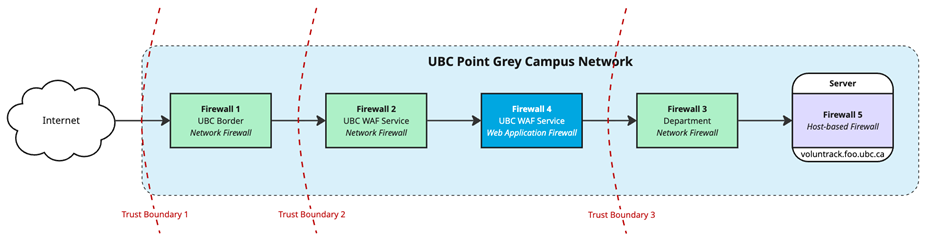
There are five Network Firewalls to take into consideration for this section:
- Firewall 1: The Network Firewall at the UBC border, which sits between the UBC network and the internet.
- Firewall 2: The Network Firewall in front of the UBC Web Application Firewall service, which is provisioned within the UBC Virtual Firewall service.
- Firewall 3: The department Network Firewall, which is provisioned within the UBC Virtual Firewall service.
- Firewall 4: The Web Application Firewall, which is provisioned within the UBC Web Application Firewall service.
- Firewall 5: The Host-based Firewall on the Server.
The simplified diagram below shows the different firewalls and trust boundaries.
| M10 Section | Compliant? | Notes / Recommendations |
|---|---|---|
| 4.1 | Yes | The Server sits behind the department Network Firewall (Firewall 1) and is therefore compliant. |
| 4.2 | Firewall 1 – Yes | Compliance is managed by UBC Cybersecurity . |
| Firewall 2 – Yes | Compliance is managed by the UBC Cybersecurity (Web Application Firewall service team). | |
| Firewall 3 – Yes | Compliance is managed by the departmental system administrators, who must remain diligent and perform annual reviews of rule sets to remain compliant. | |
| Firewall 4 – n/a | Firewall 4 does not use ACLs, as all ACL functionality is performed on Firewall 2. | |
| Firewall 5 – No | Firewall 5 was found to allow all inbound traffic from other peer hosts on its network, including SSH and HTTP/HTTPS. This is not compliant with section 4.2.5. Recommendations: (a) Configure the Host-based firewall ACL to handle inbound traffic as follows: - Allow inbound traffic to port 22 (SSH) only from the named department myVPN pool IP subnet, as that’s the network used to perform system administration activities. - Allow inbound traffic to port 443 (HTTPS) only from the IPs of the UBC Web Application Firewall service, as all inbound requests will be proxied by that service and allowing inbound requests from any other IP addresses provides a potential path for attackers to bypass the Web Application Firewall. Additional inbound IP ranges may be carefully considered if necessary for troubleshooting and maintenance. - Deny all other inbound traffic as it is not required. (b) Add the rule set for Firewall 5 to the list of firewall rule sets that the departmental system administrators must review annually. | |
| 4.3 | Yes | All firewalls that make use of the UBC Virtual Firewall service are considered to be dedicated firewalls, and are therefore compliant with this section. |
| 4.4 | Yes | Firewalls 1 through 3 (Boundary-protected Interfaces) are fully managed through centralized services, and are therefore assumed to be compliant with this section. |
| 4.5 | Yes | Firewall 1 is configured with IPS/IDS and performs this inspection in both directions. |
| 4.6 | Yes | Firewalls 1 through 4 are provided as part of centralized services, and are therefore assumed to be configured in compliance with this section. - Firewall 1 is provided centrally by UBC Networks and UBC Cybersecurity. - Firewalls 2 and 3 are part of the UBC Virtual Firewall service. - Firewall 4 is provided by the UBC Web Application Firewall service. Firewall 5 is not configured for high-availability. |
| 4.7 | Yes | All Network Firewalls in this scenario are provided as part of centralized services, and are configured in compliance with this section. The Host-based Firewall has also been assessed and is configured in compliance with this section. |
| 4.8 | Yes | All Network Firewalls in this scenario are provided as part of centralized services, and are configured in compliance with this section. |
| 4.9 | Yes | All Network firewalls in this scenario are provided as part of centralized services, and are configured in compliance with this section. |
| 4.10 | Yes | The Server is configured with a Host-based Firewall and is therefore compliant with this section. |
| 4.11 | Yes | Logs for Firewalls 1 through 4 are provided as part of centralized services and are therefore assumed to be configured in compliance with this section. Firewall 5 logs are part of the system logs on the Server, and it was determined they are being retained elsewhere in compliance with the Logging and Monitoring of UBC Systems standard. |
| 4.12 | Yes | Firewalls 1 through 4 are provided as part of centralized services, and are therefore assumed to be configured in compliance with this section. If the Server is configured in compliance with the Vulnerability Management standard, then Firewall 5 is also considered to be compliant. |
Related Documents and Resources
Policy SC14, Acceptable Use and Security of UBC Electronic Information and Systems
Security Architecture and Firewalls standard
Guideline Last Revised: 2026-01